Introduction
I needed LLMs to do actual work: summarize CVEs, draft Snort rules, analyze code and extract IOCs. llmtools is the collection of scripts and utilities that grew from that use.
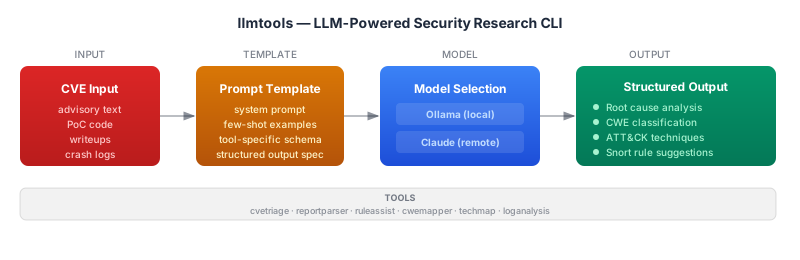
What is in it
The main tool is llm, a Python script that wraps Ollama, Claude, GPT and Groq behind a single CLI. It handles both /api/generate (single-turn completions) and /api/chat (multi-turn) endpoints, reads the prompt from stdin or a -u argument and writes the response to stdout. Pipe in a CVE writeup, pipe out the analysis.
Let's have a look at the basic usage:
$ echo "explain CVE-2024-3094" | llm -m foundation-sec -t vuln_research -v
  model: foundation-sec-8b:latest
  prompt_system: Analyze this vulnerability report and present a 10 point ...
  prompt_user: explain CVE-2024-3094
  assistant:
$ llm -m claude -u "generate a Snort rule for HTTP directory traversal" -t cybersecThe -t flag selects from built-in system prompt templates. Let's have a look at what is available:
config.sysprompt_templates = {
  "code_expert": "You are an expert coding assistant ...",
  "code_generate": "Provide only code as output without any description ...",
  "cybersec": "You are a network and cybersecurity expert. You answer every
               questions with absolute facts and details. You back your
               statements with references to RFC and standards.",
  "default": "Below is an instruction that describes a task. Write a short
              response that appropriately completes the request ...",
  "func_name": "Given the following decompiler output for a function, analyze
                its operations, logic, and any identifiable patterns to suggest
                a suitable function name ...",
  "vuln_research": "Analyze this vulnerability report and present a 10 point
                    summary. Extract the wisdom behind how the vulnerability
                    presents itself and how it can be exploited ...",
  "shell_generate": "Provide only {shell} commands for {os} without any
                     description ...",
  "shell_explain": "Provide a terse, single sentence description of the given
                    shell command ...",
}
The -f flag loads Fabric patterns from disk, so any community prompt pattern works without modification.
Model selection uses fuzzy matching against whatever Ollama has pulled locally plus the remote API names:
$ llm -m foundation   # matches foundation-sec-8b:latest
$ llm -m claude       # routes to Anthropic API
$ llm -m groq         # routes to Groq API
$ llm -m llama3       # matches llama3:latest
The -j flag outputs structured JSON with token counts and timing:
{
  "model": "foundation-sec-8b:latest",
  "text": {
    "system": "Analyze this vulnerability report ...",
    "user": "explain CVE-2024-3094",
    "assistant": "1. The vulnerability in xz Utils (CVE-2024-3094) ..."
  },
  "stats": {
    "tokens": 847,
    "tokens_per_second": 42.3,
    "runtime": 20.02
  }
}
llmrag is a companion tool for RAG workflows. It uses ChromaDB with Ollama embeddings to store and query text against local vector collections:
$ echo "heap overflow in HTTP parser" | llmrag add -c cve_notes
$ llmrag find -c cve_notes -t "buffer overflow vulnerability"
$ llmrag list
hexwhisper generates network packet hex from natural language descriptions. The use case is creating test packets for Snort rule development:
$ echo "tcp syn packet to port 22 from 10.1.1.1" | hexwhisper
$ hexwhisper "malformed http request with buffer overflow attempt" --llm claude
$ hexwhisper "udp dns query for example.com" | text2pcap - test.pcap
It outputs structured JSON with per-layer hex, Wireshark-compatible field names and the assumptions the model made during generation.
The CVE analysis prompt
This is the most-used prompt template. The vuln_research template is the short version, but the real workhorse is a longer system prompt I pipe in directly:
You are a cybersecurity expert, specializing in vulnerability analysis and research.
You can help by extracting insightful information like root cause analysis, type of
the vulnerability (referencing the Common Weakness Enumeration - CWE framework from
NVD), MITRE ATT&CK techniques useful for exploiting the vulnerability and steps to
replicate the issue from a given vulnerability writeup. Think deeply about what's
most important in the writeup and connect the dots. Create a summary sentence that
captures the spirit of the writeup and its insights in less than 25 words. Remember
to include references to the relevant code sections, functions and variables where
applicable. Include suggestions for how to write Snort IPS rules for detecting the
described bug.
Let's have a look at this in action. Here is the pipeline for analyzing a CVE writeup:
$ curl -s "https://nvd.nist.gov/vuln/detail/CVE-2024-3094" \
  | llm -m foundation-sec -s "$(cat cve_analysis_prompt.txt)" -j \
  | jq '.text.assistant'
The output fields I actually use: root cause summary, CWE ID, relevant MITRE ATT&CK techniques and the Snort rule suggestions. The 25-word summary is useful for quickly deciding whether a CVE is worth deeper reading before committing to the full writeup.
The tidal pipeline in the same repo automates CVE collection and MITRE ATT&CK correlation. It collects CVE data, processes it and formats ATT&CK Navigator layers:
$ ./tidal/bin/collect-all.sh          # pull CVE + MITRE data
$ ./tidal/processors/process-cve.sh   # enrich with ATT&CK mappings
$ ./tidal/processors/correlate-cve-mitre.sh  # cross-reference
$ ./tidal/formatters/format-attack-layer.sh  # ATT&CK Navigator JSON
The tidal output feeds into the llm tool. Collected CVE writeups go through llm -t vuln_research for structured analysis. The ATT&CK mappings validate what the model suggests.
Local vs remote
For CVE analysis and code review involving internal data — unpublished research, unpatched vulnerabilities, proprietary code — local models under Ollama are the right choice. The data does not leave the machine. Foundation-Sec-8B is the current default for security tasks: an 8B parameter model with security-focused training. For CVE triage it produces better-structured output than general models of the same size and actually understands what CWE categories mean instead of pattern-matching on the names.
For tasks where data sensitivity is not a concern, Claude handles nuanced analysis better: understanding the context around a vulnerability, connecting it to a broader attack class and reasoning about what detection needs to catch. The tradeoff is cost and the data going to Anthropic's API.
I use local models for initial triage and anything involving sensitive data, remote for refinement and tasks that need better reasoning.
Conclusion
First-pass triage is where LLMs are most useful: summarizing a CVE writeup, suggesting a CWE category and flagging relevant MITRE techniques. These tasks take a few minutes each by hand and are tedious at scale. batch_analyze.py across a queue of writeups produces structured summaries of a hundred CVEs in the time it takes to read five carefully.
Where they fail: precise Snort rule syntax. The suggestions from the CVE analysis prompt are direction, not finished rules. LLMs produce rule options that look valid but are not — wrong field names, misused keywords and content matches that would not survive compilation. The suggestions tell you what to look for in the traffic, but every rule needs to be written by hand against the Snort documentation and tested against real traffic.
The workflow that settled out: LLM for context and direction, human for the actual signature. The model tells me what the exploit traffic looks like based on the writeup. I write the rule from that understanding, not from the model's draft. Foundation-Sec-8B is better at understanding what a vulnerability actually means — the semantics of a heap overflow versus a type confusion — than general models that pattern-match on security terminology.
GitHub: llmtools